L
ading....
L
ading....
Bistro Boss is a full-stack restaurant web application that allows users to browse food items, manage a shopping cart, and place orders with secure Stripe payments, built using React, Firebase authentication, and a Node.js backend.
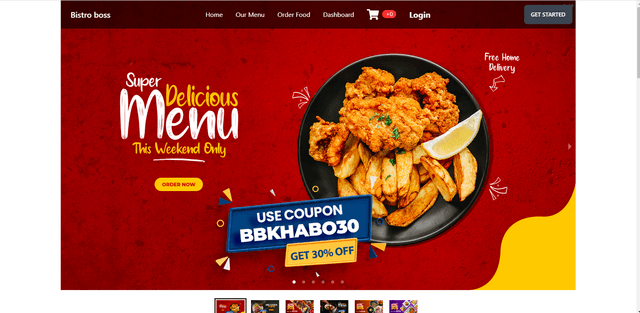
Discover the key features and technical excellence that make this project stand out in our portfolio.
Full Stack
Clean, maintainable code following industry best practices
Cutting-edge solutions tailored to specific business needs
Rigorous testing and optimization for peak performance
Bistro Boss is a modern restaurant web application designed to simulate a real-world online food ordering experience. Users can explore the complete food menu without authentication, while advanced features such as adding items to the cart and placing orders require user login.
The application supports email/password authentication and Google OAuth, managed through Firebase. To improve login security and prevent automated abuse, CAPTCHA validation is implemented on the login page.
Food data and cart-related information are fetched efficiently using TanStack Query and Axios, enabling smooth data synchronization and minimizing unnecessary API calls. Users can add multiple food items to their cart, review selections, and proceed to checkout.
For payments, Stripe SDK is integrated using a frontend card collection and backend payment creation flow. Card details are securely submitted from the frontend, and the backend handles payment intent creation and confirmation. Although Stripe webhooks are not implemented, the payment flow successfully demonstrates secure client-server communication for real-world payment handling.
The cart state is managed using localStorage, ensuring cart persistence across page refreshes and browser sessions. The user interface is built with Tailwind CSS, DaisyUI, Swiper, and interactive alerts using SweetAlert, delivering a clean, responsive, and user-friendly experience.
Public food menu browsing without authentication
Email/password & Google login via Firebase
CAPTCHA-protected login to prevent automated abuse
Add, update, and remove food items from cart
Persistent cart using localStorage
Stripe card payment integration (client → server flow)
Efficient data fetching with TanStack Query
Responsive and modern UI using Tailwind CSS & DaisyUI
Challenge:
Handling card payments securely without exposing Stripe secret keys on the client side while maintaining a smooth checkout experience.
Solution:
Card details are collected on the frontend using Stripe’s secure components, while the actual payment creation is handled on the backend using the Stripe SDK. This approach ensures sensitive operations remain server-side, follows Stripe’s security best practices, and demonstrates a real-world payment flow even without webhook implementation.
Challenge:
Ensuring the shopping cart remains intact after page reloads or accidental browser refreshes without implementing a full backend cart system.
Solution:
The cart state is stored in localStorage, allowing cart data to persist across sessions. This approach simplifies implementation while still providing a reliable user experience for small to mid-scale applications.
Challenge:
Login forms are common targets for bots and brute-force attempts.
Solution:
CAPTCHA was integrated into the login flow, adding an extra verification layer and reducing the risk of automated abuse while keeping the user experience simple.
Challenge:
Repeated API calls for food and cart data can degrade performance and increase server load.
Solution:
TanStack Query was used to handle data fetching, caching, and re-fetching logic efficiently. This reduced redundant network requests and ensured consistent UI state across components.
Frontend: React.js, React Router, Tailwind CSS, DaisyUI, Swiper
State & Data: TanStack Query, Axios
Authentication: Firebase (Email/Password, Google OAuth)
Payments: Stripe SDK
Backend: Node.js, Express.js
Utilities: SweetAlert, CAPTCHA