L
ading....
L
ading....
A modern, high-impact landing page built for an AI + blockchain product, focusing on premium UI design, smooth interactions, and advanced responsive behavior—especially around adaptive tooltips for desktop and mobile users.

Discover the key features and technical excellence that make this project stand out in our portfolio.
Frontend
Clean, maintainable code following industry best practices
Cutting-edge solutions tailored to specific business needs
Rigorous testing and optimization for peak performance
Theseus Landing Page is a visually rich, minimalist marketing website designed to communicate a complex AI + blockchain concept through clean typography, dark-themed aesthetics, and subtle motion. The project emphasizes UI craftsmanship, responsive interaction design, and accessibility-aware behavior, making it suitable for both desktop and mobile audiences.
The landing page includes a hero section with strong messaging, feature highlight blocks, content sections explaining the core technology, and multiple call-to-action areas such as whitepaper downloads. While the project is intentionally lightweight in scope, it demonstrates strong frontend fundamentals, attention to UX details, and production-level polish.
A key technical focus of this project was implementing adaptive tooltip behavior that changes interaction patterns and visual styles depending on the device type, ensuring usability across all screen sizes.
Modern Dark-Themed UI Design
Designed a premium dark UI with subtle gradients, texture overlays, and consistent spacing to align with AI/blockchain branding and enterprise-level aesthetics.
Fully Responsive Layout Across Devices
Built a responsive grid and typography system that adapts seamlessly from large desktop screens to tablets and mobile devices without layout breakage.
Adaptive Tooltip Interaction (Desktop vs Mobile)
Implemented tooltips that behave differently based on input type:
Hover-based tooltips for desktop users
Click/tap-based tooltips for mobile users
This ensures accessibility and usability without relying on hover on touch devices.
Device-Specific Tooltip Styling
Tooltips dynamically switch styles depending on screen size:
Compact, subtle tooltips for desktop
Larger, touch-friendly tooltip layouts for mobile
This improves readability and avoids accidental dismissals on smaller screens.
Performance-Focused Static Landing Page
Optimized assets and layout to ensure fast load times and smooth animations, making it ideal for marketing and product-launch use cases.
Reusable UI Components
Structured components in a reusable and scalable way, allowing future expansion or integration into a larger marketing site or CMS-driven system.
Problem:
Hover-based tooltips work well on desktop but completely fail on mobile devices where hover does not exist.
Solution:
Implemented conditional interaction logic based on screen size and pointer type
Enabled hover events for desktop and click/tap events for mobile
Ensured tooltips close gracefully on outside click or second tap
This approach delivered a consistent UX across all devices without breaking accessibility.
Problem:
A single tooltip design was either too small for mobile or too large and intrusive for desktop users.
Solution:
Created device-specific tooltip styles
Used responsive breakpoints to switch layouts dynamically
Adjusted spacing, font size, and positioning for touch-friendly interaction
This resulted in tooltips that feel native to each device type.
Problem:
Dark-themed UIs can easily suffer from poor contrast, readability issues, or visual noise.
Solution:
Carefully balanced contrast ratios for text and UI elements
Used subtle gradients and overlays instead of harsh colors
Maintained consistent spacing and alignment throughout sections
This ensured clarity while preserving the premium visual feel.
Gained deep experience designing device-aware UI interactions
Learned how to build adaptive tooltip systems without relying on third-party libraries
Improved skills in responsive UI engineering beyond layout
Strengthened understanding of UX differences between mouse and touch input
Enhanced ability to deliver high-quality UI even in small-scope projects
Explore more projects from our portfolio
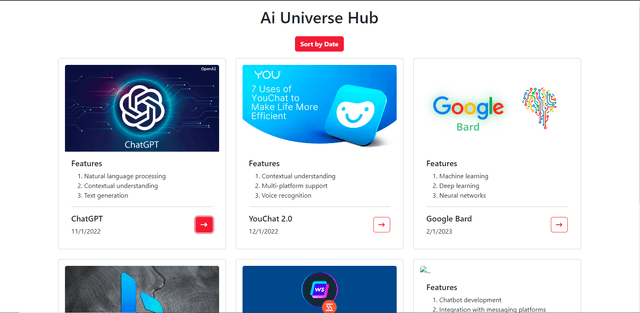
This is a website on AI and its description. Hare uses HTML, CSS, Bootstrap JSON data-facing system, and JavaScript.
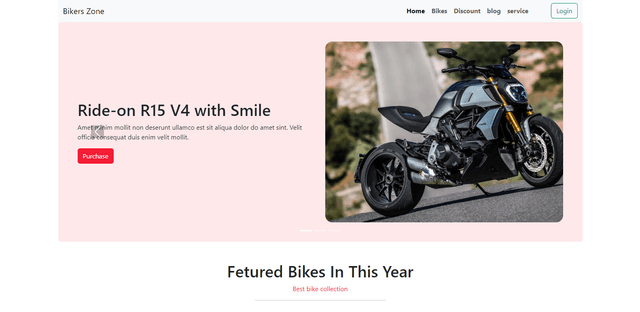
This is a bike website project made with only HTML CSS and Bootstrap. Here I don't use any JavaScript so any button will not work properly except the...
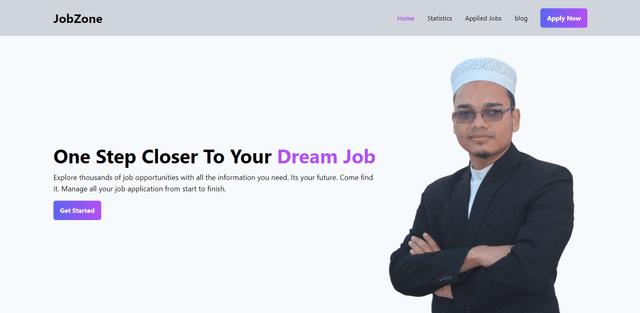
This is a job market website. Hare offers to user for choose view and apply on the job